


SmartPack - packing lists
4.016.00 Reviews
App Specs
- Version
- 2.9.3
- Updated On
- License
- Free
- Downloads
- 10,000+
- Developer
- Acquasys
- Categories
- Travel & Local
- Platform
- Android
Screenshots
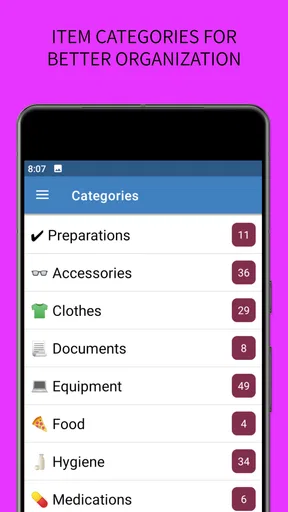
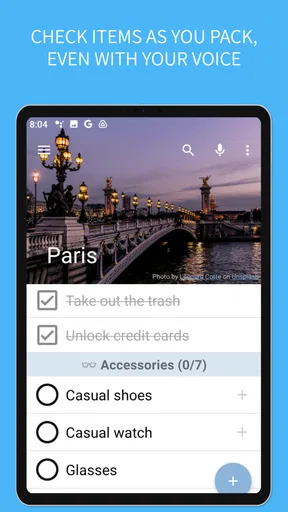
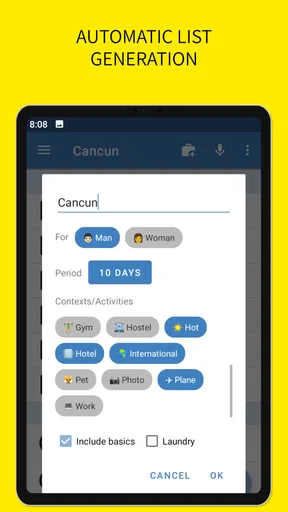
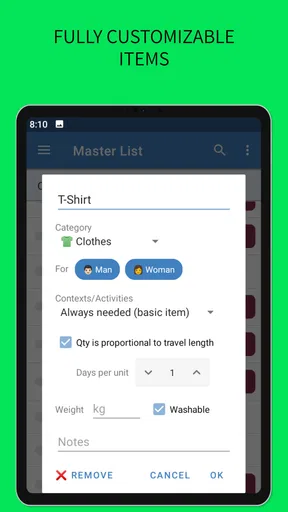
 Analysis by AppCompare
I usually think of packing lists as the kind of thing I can handle in a notes app, until I am preparing for several days away and suddenly cannot remember whether I packed chargers, medication, or the small items I only use at home. SmartPack - packing lists approaches that problem as a dedicated travel and local app rather than a blank page. After spending time with it, I see the appeal: it is built for people who want a repeatable packing routine, not just a temporary checklist.
My overall impression is that SmartPack is most useful when packing is a recurring task. It gives you a more organized starting point than typing “socks, toiletries, documents” into a note, while still leaving room to shape the list around your own habits. It is free to install, aimed at Everyone, and works on Android devices running version 8.0 or later. The developer is Acquasys, and the current release is 2.9.3.
What I looked for before trusting a packing app
The first question I ask is whether an app actually reduces decisions. A useful packing assistant should help me begin quickly, separate essentials from optional items, and make it easy to adapt a list when the destination or length of a trip changes. If I still have to rebuild everything from scratch each time, a simple note may be just as effective.
I also look at how well the app fits different travel styles. A weekend city break needs a different rhythm from a family holiday, a business trip, or a camping outing. The best choice is not necessarily the app with the most buttons; it is the one that lets me create a practical routine without making packing feel like another project.
SmartPack makes sense under those criteria because its central idea is customization. Rather than treating packing as one universal checklist, it is designed around lists that can be adjusted to the way I travel. That matters more than it sounds. I do not pack the same things for a warm hotel stay, a work visit, and a trip where I will be doing laundry.
Another decision point is whether I need a dedicated tool at all. A basic notes app wins when I want to jot down a few reminders immediately, especially for a single overnight trip. A calendar or travel-planning app may be better if my main concern is flights, reservations, maps, or itineraries. SmartPack is narrower, and that narrow focus is both its strength and its limitation.
How I would set up a useful routine
I would not begin by trying to create one enormous master list containing every object I might ever pack. That quickly becomes noisy. Instead, I would build a dependable base around items that travel with me often, then add trip-specific details only when they matter. The goal is to make the list reflect decisions I have already made, not to make me decide everything again.
Worth Reading Before You Choose

Flipboard Shows What News Apps Must Do Beyond the Feed

Switching to Android Auto Means Rethinking Your Driving Routine

Google Calendar Makes a Crowded Week Easier to Manage

Ludo King Makes the Most of the Minutes Between Plans

Baby Panda World Brings Quick Play to Modern Phones, but Its Game Library Feels Busy

ESPN’s Live Game View Makes Following Close Games Easier
A practical approach is to think in layers. The first layer is the personal minimum: identification, payment essentials, medication, phone, and anything that would be genuinely difficult to replace. The second is the trip layer: clothing, work materials, activity equipment, or weather-related items. The third is the comfort layer, where I decide whether an extra cable, book, or familiar toiletry is worth the space.
This way of using a customizable packing tool has an important advantage over a paper list. I can keep the recurring structure while changing the temporary details. For example, I might prepare a work-trip version with a laptop and presentation accessories, then remove those items when creating a leisure list without losing the rest of my routine.
Where SmartPack feels more useful than a blank note
The strongest part of SmartPack is that it treats packing as a reusable process. A blank note is flexible, but it gives me no structure until I create one. With a dedicated packing assistant, I can approach the task as a checklist that belongs to a specific kind of trip. That distinction is valuable for anyone who travels often enough to repeat the same decisions.
I also like the possibility of tailoring the experience instead of accepting a rigid, generic list. Generic packing advice often assumes a particular climate, trip length, or travel style. A customizable system is more realistic because the correct answer depends on what I am doing once I arrive. A person attending meetings needs a different checklist from someone spending the same number of days outdoors.
One non-obvious benefit is the way customization can expose personal patterns. If I repeatedly add the same item after starting a list, that item probably belongs in my base routine. If I repeatedly remove something, it may be unnecessary clutter. Over time, the app can become a record of how I actually travel rather than how a generic guide says I should travel.
Another useful workflow is to pack in passes instead of trying to finish everything at once. I can first deal with essentials, then clothing, then electronics and personal items. That reduces the chance that a late distraction causes me to forget something important. A dedicated checklist is especially helpful here because it gives me a visible stopping point for each group.
For a realistic everyday example, imagine leaving early on a Friday for a short work trip. On Thursday evening, I would open the relevant list and handle the items that cannot be replaced easily. I would then check clothing and toiletries, followed by work equipment. On the morning of departure, I would do a final pass for items that had to remain in use overnight. That last step is where a packing list earns its place: it catches the things that were deliberately left out until the end.
Small decisions that make the app work better
I would keep the list readable rather than turning it into a complete inventory of my home. If every minor object appears every time, the act of checking becomes tiring and important items lose attention. SmartPack is at its best when customization creates a focused list, not when it becomes a digital storage room.
I would also separate “must take” items from “nice to have” items whenever the app’s organization allows me to do so. That distinction helps when luggage space changes. If my bag is full, I can cut comfort items without debating whether medication or documents are negotiable.
A further tip is to review the list after the trip, while the experience is still fresh. I would remove things I never used, add anything I wished I had brought, and adjust the list for the next similar journey. This turns packing into a feedback loop. The value is not only in checking boxes before departure; it is in making the next departure easier.
SmartPack can also be useful for people who pack for more than themselves. A family trip often fails at the small-item level: one person remembers clothing, another remembers chargers, and nobody is sure who handled shared supplies. A carefully customized list can make responsibility clearer, even if the app itself does not replace communication between travelers.
Where other types of apps may fit better
I would not choose SmartPack as my main travel app if I primarily need bookings, route planning, destination research, or live travel updates. A broader travel organizer may be a better fit for someone who wants the whole journey in one place. SmartPack’s value is concentrated on preparation, and that is a good reason to use it alongside another tool rather than expecting it to replace one.
A notes app may still win for a spontaneous overnight stay. Opening a familiar note and typing a few reminders can be faster than maintaining a dedicated system. The trade-off is that notes tend to become messy over time, especially when old lists are copied, edited, and forgotten. SmartPack becomes more compelling when I want consistency across repeated trips.
Paper has its own advantage: it is immediate, visible, and independent of a device. Some people genuinely prefer crossing items off with a pen, and they should not switch merely because an app exists. The reason to move to SmartPack is not novelty; it is the ability to refine and reuse a packing routine.
Shared checklist tools may be preferable when several people need to edit the same list at the same time. A dedicated personal packing assistant is a better match when one traveler is responsible for organizing their own luggage. Before switching, I would ask whether my problem is remembering what to pack or coordinating who packs what. Those are related problems, but they are not identical.
What the free model means in practice
SmartPack is free, which makes it easy to try without committing money at the start. There are in-app purchases priced at $3.99 per item, so I would explore the free experience first and decide whether the additional value fits my routine. For an occasional traveler, paying may not feel necessary. For someone who repeatedly relies on customized lists, an upgrade can be easier to justify if it removes a limitation that affects regular use.
The cost of switching is not financial alone. I would need to spend time shaping the app around my own trips, and that setup only pays off if I return to it. A person who travels once a year may get more practical value from a simple reusable note. Someone who takes frequent work trips, travels with children, or regularly changes activities has more opportunities to benefit from a refined system.
I also would not migrate every old list immediately. I would start with the trip type I repeat most often, use SmartPack for that journey, and see whether the checklist genuinely reduces forgotten items and last-minute stress. If it does, I would gradually create other versions. This trial approach keeps the switching effort controlled and gives me a fair comparison with the method I already use.
Who should use it, and who should skip it
I think SmartPack is a strong candidate for frequent travelers, people who often forget small essentials, and anyone who enjoys turning repeated chores into a reliable routine. It is particularly suitable when trips vary enough to need customization but repeat often enough to justify maintaining several packing patterns.
It is also a sensible choice for travelers who want more structure without adopting a full travel-management platform. The app’s Travel & Local category describes its practical role well: it supports the preparation side of going somewhere, rather than trying to manage every part of the journey.
I would skip it if I only need a handful of reminders, dislike digital checklists, or want collaborative trip planning as the main feature. I would also be cautious if I tend to create elaborate systems and then stop using them. No packing assistant can compensate for a workflow that is too complicated to open before leaving.
The app has an average rating of 4.0 from around 170 ratings, with roughly 16 written reviews, and it has passed 10 thousand installs. Those figures suggest a modest but established user base rather than a huge mainstream service. I would interpret that as a reason to judge it by personal fit, not popularity: the app may be exactly right for a careful packer even if it is not a universal travel platform.
My recommendation after weighing the trade-offs
My recommendation is straightforward: try SmartPack if your packing mistakes come from repetition, changing trip types, or relying on memory. Its customizable approach is more useful than a generic list when I need a dependable starting point that still reflects my own habits. The best results come from keeping lists focused, reviewing them after trips, and building separate routines for genuinely different kinds of travel.
I would not recommend switching just to replace a quick note for a single trip. In that situation, the setup may be more effort than the problem deserves. But if I am repeatedly packing for work, family travel, short breaks, or activity-based trips, a dedicated assistant has a clearer advantage because it turns preparation into a repeatable workflow.
My final view: SmartPack is worth trying when you want a personal packing system, not merely a temporary checklist. It is free to start, suitable for Everyone, and the current version supports devices using Android 8.0 or later. I would treat it as a focused companion for luggage preparation, keep expectations away from full itinerary management, and decide about the optional purchases only after the free workflow proves useful in real life.
For me, that balance is the reason to recommend it. It does not need to replace notes, paper, or a broader travel app for every user. It simply needs to make the moment before leaving more dependable. When a customized list helps me stop wondering whether I packed the essentials and lets me concentrate on the trip itself, it has done its job.
Pros
- Simple interface makes creating and checking packing lists quick.
- Reusable lists help streamline preparation for frequent trips.
- Items can be organized for different travel needs and occasions.
- Useful for tracking essentials and reducing the risk of forgetting items.
- Lightweight app with a focused purpose and minimal distractions.
Cons
- May feel too basic for users wanting full trip-planning tools.
- Advanced collaboration features may be limited or unavailable.
- Manual item entry can become time-consuming for large packing lists.
- Customization options may not satisfy users seeking detailed categories.
- Some features may depend on the app version or device compatibility.
FAQs for SmartPack - packing lists
What is SmartPack - packing lists used for?
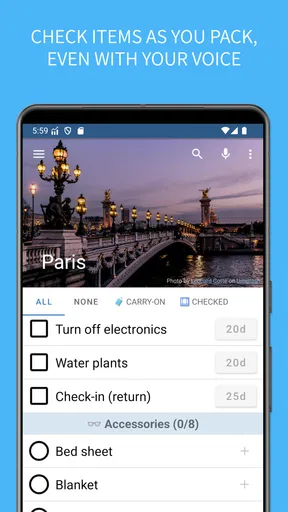
SmartPack - packing lists is designed to help you organize what you need to take on trips, holidays, business travel, camping adventures, and other outings. You can create packing lists, add individual items, and check them off as you prepare. It is especially useful when you often forget essentials or want a clear overview of your luggage before leaving.
Can I create and customize my own packing lists in SmartPack?
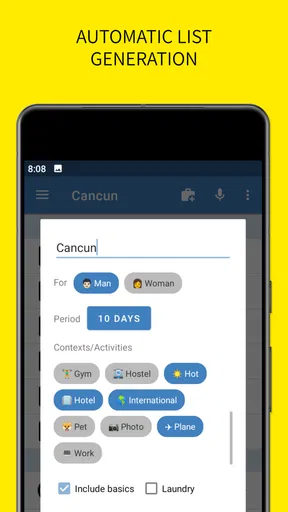
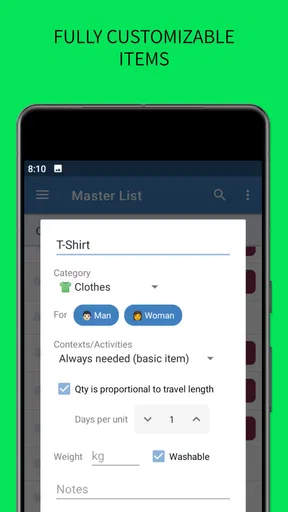
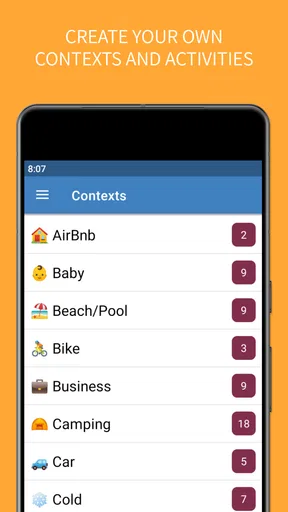
Yes, the app is intended to make packing lists flexible rather than forcing everyone to use the same checklist. You can generally create lists for different trips or situations, add the items you personally need, and adjust the contents as your plans change. This makes it suitable for everything from a short weekend away to a longer trip with specialized equipment.
Does SmartPack - packing lists work offline?
A packing-list application is most useful when it remains available while you are preparing luggage or traveling without reliable internet access. SmartPack is primarily focused on managing your saved lists on the device, so you can normally review and update them without needing a constant connection. However, features involving synchronization, sharing, advertisements, or external services may depend on connectivity.
Is SmartPack suitable for family trips or group packing?
SmartPack can be useful for family travel because separate lists can help organize clothing, toiletries, documents, electronics, and other essentials for different people. You can also create lists based on the destination or activity, reducing the chance that important items are overlooked. For large groups, it is still worth checking whether the specific version supports collaborative editing or list sharing.
Is SmartPack - packing lists free to download and use?
SmartPack - packing lists may be available to download at no initial cost, but the exact pricing model can vary depending on the platform and current app version. Some functions may include advertisements, optional purchases, or premium features. Before installing, check the Google Play Store or Apple App Store listing for the latest information about supported devices, in-app purchases, privacy details, and any limitations in the free version.


